 Birthday Countdown
How to Make a Birthday Countdown Video for WhatsApp Status
A birthday countdown on your WhatsApp Status is a fun way to say “guess whose birthday is coming!” It gets everyone excited and reminds friends to send their wishes. Here’s how to make a birthday countdown video with a photo and music, then share it to your Status or Instagram Story.
What you’ll need
- An Android phone with WhatsApp (or Instagram)
- The free Birthday Countdown app from Google Play
- A favorite photo of the birthday person (optional, but it makes all the difference)
Step 1: Add the birthday
Open Birthday Countdown and add a birthday. All you need is a name and a date of birth. The app works out how many days are left and how old they’ll turn, and starts a live countdown right away. There’s no sign-up.
Step 2: Design the countdown
Open the design tools to make it look the way you want:
- Background: use your own photo or pick one from the gallery, and add a background filter if you like.
- Title: change the font, color and text highlight of the name.
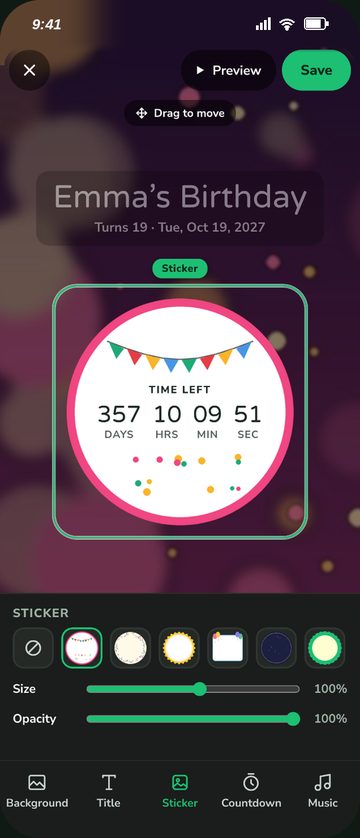
- Sticker: add a sticker around the countdown.
- Layout: move, turn or hide anything on screen until it looks just right.
Step 3: Turn on the birthday music
A countdown video feels more like a celebration with music. Make sure the birthday music is turned on so it plays in the video.
Step 4: Share it as a video
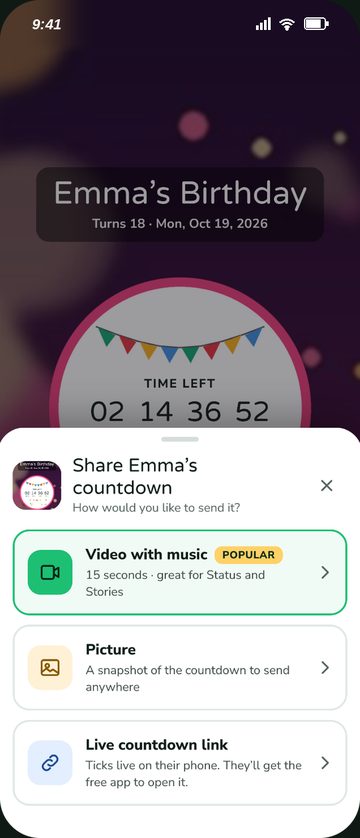
Tap share and choose Video with music. The app creates a short video of your countdown, perfect for a Status or Story.
Step 5: Post it to your WhatsApp Status
- When the share sheet opens, choose WhatsApp.
- At the top of the list, tap My status.
- Add a caption if you like, such as “Only 7 days to go!”, and send.
Want to post to Instagram instead? Choose Instagram from the share sheet and pick Story.
Tips for a great birthday countdown Status
- Post it a week before. It gives friends time to plan their wishes and gifts.
- Post updates. Share a new countdown video at 7 days, 3 days and 1 day to go to build excitement.
- Pick a photo that makes them smile. A funny throwback or a favorite photo together works better than a formal picture.
- Keep the caption short. “3 days until Emma’s birthday!” says it all.
- Celebrate on the day. When the countdown reaches zero, it turns into a birthday celebration. Share that too!
Prefer a live link?
Instead of a video, you can share a live countdown link. It ticks down in real time on their phone, so they can check it every day until the big day.
Need a caption? Try our birthday wishes for your best friend or birthday wishes for Mom.
Keep reading
How to Never Forget a Birthday Again
Seven small habits that turn “Oh no, was that today?” into the friend who always remembers.
5 min read →
45 Birthday Wishes for Mom
Sweet, funny, heartfelt and short messages for the woman who’s done everything for you.
6 min read →
Surprise Birthday Party Checklist: Your Week-by-Week Countdown
A step-by-step countdown from four weeks out to the moment everyone shouts “Surprise!”
7 min read →